
I spent the Labour Day long weekend setting up an LLM Knowledge Base. The basic idea was to use AI to build and maintain a personal knowledge base for all the research and notes I’d accumulated over the past 10+ years.
I fed it thousands of articles, highlights, and book passages I’d been accumulating for years in Evernote, built an AI pipeline to keep it growing, and waited for a couple of hours for Claude Code to crunch through the whole thing.
I was surprised to find that about 50% of my conceptual knowledge was theology and faith. This was a little surprising, honestly. It wasn’t what I’d expected to find at all.
But more on that later. Let’s start from the beginning.
What an LLM Knowledge Base actually is
The idea comes from a viral X post by Andrej Karpathy (one of the founding members of OpenAI), and it’s worth explaining briefly because it’s quite different from the typical note-taking approach.
Most knowledge management tools like Notion or Evernote are fundamentally retrieval systems. You take notes, tag them, and hope to find them again later. For example, for years, I’d been organising my Evernote notebooks around topics like Business, Creativity, Leadership, Metaphysics, etc.
But when it comes to synthesising and connecting ideas, you have to do the work. If I wanted to understand the connection between say, Chris Voss’s negotiation techniques and Charles Duhigg’s concept of supercommunicators, I’d need to draw that connection myself.
An LLM knowledge base flips this. Instead of tagging notes yourself, you feed raw material, such as articles, highlights, and books, into a folder, and ask an AI to compile a list of wikis summarising them all. The AI reads your sources, synthesises the key ideas, creates pages for concepts and people, and keeps everything cross-referenced over time. The beauty of this is that it’s self-maintaining: Every time I upload a new article or highlight, the AI ingests it, and automatically updates the right wikis.
A few people have built their own versions of this and written about it well, like this guy and even SG Foreign Minister Vivian Balakrishnan (!)
My setup: articles clipped to Obsidian, highlights captured through Readwise, and Claude Code reading everything and maintaining the wiki. It took most of a long weekend to configure. The ongoing effort is close to zero because the pipeline handles everything automatically. (If there’s interest, I can write a more detailed post on how I set mine up. Let me know!)
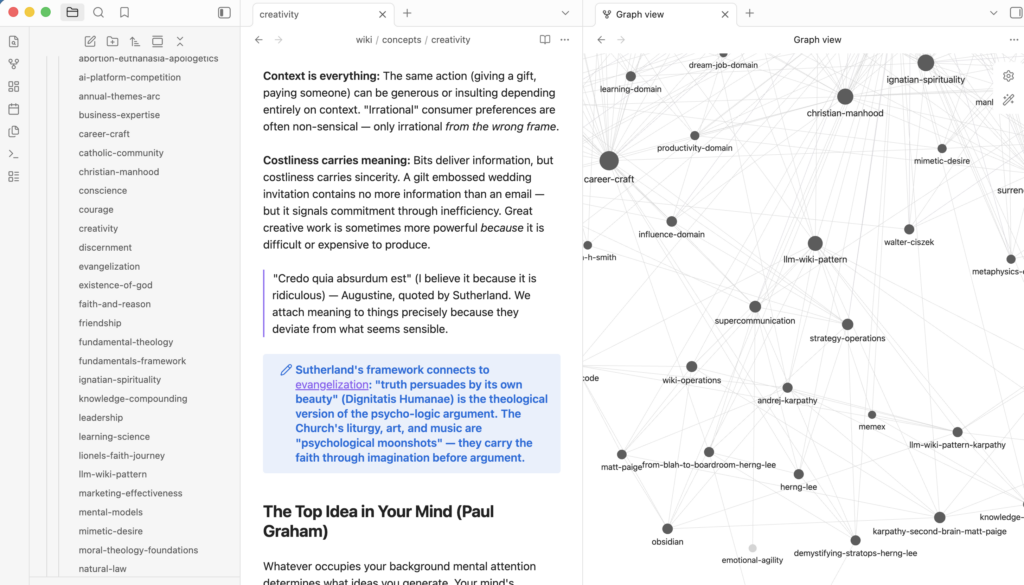
What you end up with is a repository of synthesised knowledge that grows richer every time something new comes in, without you having to organise any of it manually. Here’s what mine looks like. Obsidian even creates a nice little graph showing how all the concepts in my second brain are interlinked:
The theology problem
When I finally finished building my LLM “Second Brain”, I expected to find a knowledge base built mostly around the things I’d been reading for the past two years: AI, business, leadership, productivity. What I found instead was that 50% of my wiki concepts covered theology, faith, and spirituality.
When I thought about it more carefully, it made sense. A few years ago, I had gone through a three-year theology course and read quite widely in that space, including books, articles, and Church documents. At the time it felt like a significant part of my intellectual life. But after I graduated, my focus shifted almost entirely to career, business, and AI, and the theology material got filed away, mostly forgotten.
Recency bias doesn’t just affect how we make decisions; it affects how we think about ourselves. I had mentally updated my “intellectual identity” each time my reading shifted, and by 2026, I was firmly convinced I was primarily an AI-and-business person. The accumulated weight of everything I’d read before that window had simply stopped being top-of-mind.
But my second brain hadn’t forgotten any of it. It had no recency bias and no particular reason to weight recent reading more heavily than older reading. It saw the full shape of my intellectual life across years, and what it reflected back was more complicated, and more accurate, than my own self-assessment.
Breaking down the walls we build
Here’s where it gets interesting.
My second brain on Evernote was organised into domains: AI, business, creativity, and leadership on one side, and faith, theology, and spirituality on the other. These had always lived separately in my head, corresponding to different contexts, different conversations, and different modes of thinking. I’d never seriously tried to connect them.
But when I reviewed my AI-generated wikis, Claude had managed to find some genuinely surprising connections between domains.
For example, it drew a connection between Rory Sutherland’s idea of psychological moonshots and the Catholic tradition of using art and liturgy to communicate deep truths. Sutherland’s argument is that we over-invest in engineering solutions and under-invest in psychological ones: making a train journey 20% faster costs hundreds of millions; making it 20% more enjoyable might cost almost nothing. Reframing the problem is often more powerful than solving it.
Centuries of Church practice had arrived at the same insight: liturgy, art, and music aren’t decorations, they’re psychological interventions designed to carry faith through imagination before argument gets involved. Two completely different traditions, same underlying idea.
Another example: It paired Paul Graham’s essay on the “top idea in your mind” with the Ignatian examen prayer. Graham’s observation is that whatever occupies your background mental attention is what shapes your best thinking, so you need to be deliberate about what you let live there. The second brain linked this to a practice from Ignatian spirituality: ending each day with the question, “What do I want to carry into tomorrow?” Ignatius had essentially built a daily ritual for setting the top idea in your mind, centuries before Graham wrote it down.
I hadn’t made either of these connections myself. I’d kept these domains sealed off from each other more or less by default, and the AI ignored my partitions entirely.
What this is actually for
There’s a lot of content about personal knowledge management, and most of it centers on two things: capture (how do you quickly save interesting content) and retrieval (how do you find the right note, faster, when you need it). Both matter. But they’re a narrow definition of what a knowledge system can do.
What surprised me is what happens when an AI-maintained wiki treats your entire knowledge base as a single surface, organised not by the domains you created but by the ideas themselves. When you remove the partitions, you get a system that surfaces connections you wouldn’t have gone looking for, because you wouldn’t have thought to look across those particular lines.
My specific example involves theology and business, but the same thing happens with any combination of domains you’ve kept separate. Travel and strategy. Poetry and product design. Parenting and leadership. Whatever sits in your “personal interests” folder that has never been allowed to talk to your professional thinking.
The second brain doesn’t know which domain is serious and which is a hobby. It just sees the full shape of what you’ve been reading and thinking about, and sometimes the most interesting thing it finds is a connection that required crossing a boundary you’d drawn without really noticing it.
Go run a cross-domain query
I built this system expecting to get better at productivity: better recall, faster synthesis, sharper thinking. That may still come.
But the first thing it gave me wasn’t a productivity win. It was a more accurate picture of my own intellectual life, one that my recency-biased, domain-partitioned brain hadn’t been able to produce on its own. The second brain turned out to be a mirror as much as a tool, and the reflection was more interesting than I’d anticipated.
If you have notes scattered across Apple Notes, Google Drive, or Evernote, go build one. Karpathy himself wrote a Github gist describing the concept. All you have to do is point Claude Code at it and say “Build something like this” and it’ll do the work for you.
Once you’ve built one, run a query to find connections between the things you’ve deliberately kept separate.
You might be surprised by who’s in there.
To build something similar, you’ll need Claude Code (comes with a Pro subscription) or your favourite AI agent. For the capture layer, I used Obsidian Web Clipper to capture articles on desktop and Readwise Reader for mobile reading and newsletters. If there’s enough interest, I’m happy to do a more detailed post on how I built mine!
Discover more from cheerful.egg
Subscribe to get the latest posts sent to your email.